Edit IE Properties
Select the IE you want to see or change properties for.
-
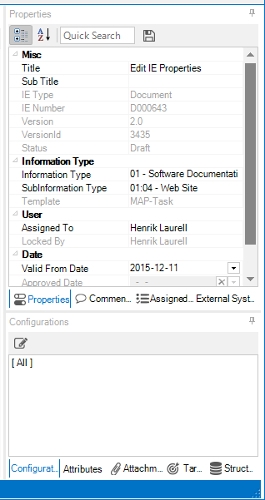
After you selected your IE, you have the properties at the right edge of Kentucky.
-
Modify the information and click on the
(save) button.
properties window-
the "Properties" panel contains most basic fields.
-
the "Comments" panel contains comments made for this IE.
-
the "Assigned task" panel lists all task this IE is assigned to.
-
the "External systems" panel list all current external systems this IE is assigned to.
-
the "Configuration" panel shows all current configurations this IE has.
-
the "Attributes" panel shows all current attributes for this IE.
-
the "Attachments" panel list all attachments added to this IE.
-
the "Targets" panel shows all id's you can use for extref links to this IE. Press Ctrl+C to copy one for insertion in another IE.
-
the "Structures" panel shows all structures/folders this IE is listed in.
-
You must press the