IE Dependencies
Select and IE and select in the preview window to see information about IE dependencies.
This preview window is possible to open in Internet Explorer by clicking in the list and then Ctrl+N. This will ALWAYS open the unfiltered content as shown on the IE base row, no matter which row was selected.
It is also possible to search within the preview window with Ctrl+F.

|
hint
Checking the dependecies is a good thing to do before approval when creating manuals. Process depends always on the work process for the specific implementation. Select the IE on the History row, to show Documents, Graphics and Excluded IEs. Check that there are no later versions of the fragments than the map, no colour markings as shown in the images here. |
In this image the IE base row is selected.  shows a list of all included IEs, nothing is removed by filters.
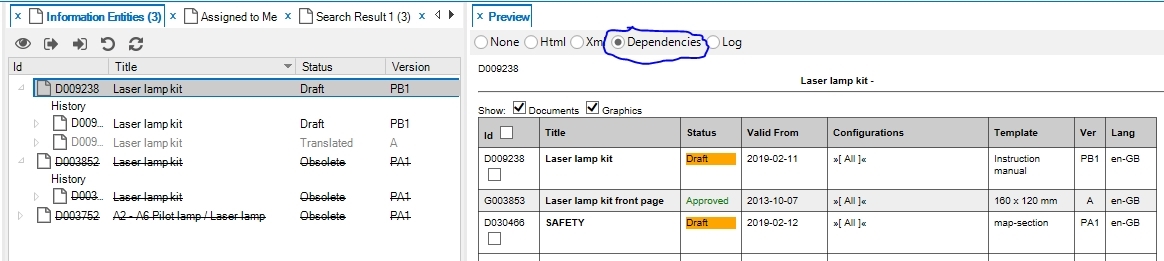
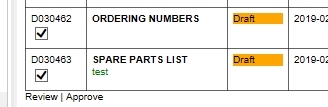
Select the history row to see what will be included in the manual at publish.

It is possible to select a translated language from the history row in order to check if all included IEs are translated. Graphics are usually not translated, but xml files that don't have a translation to that specific language will be replaced by the master language, which in our case is English. Those occasions are marked with red.

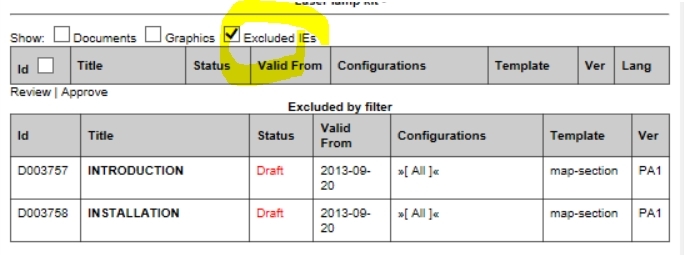
The image below shows only the excluded IEs for a manual. The colors indicate why specific IEs were excluded. In this case the map-book was approved while the two sections were in draft (taken the valid from date into consideration also).
Color coding in the dependecies list
- Orange
-
IE is in draft.
- Green
-
IE is approved or translated.
- Yellow
-
Later version is available.
- Blue
-
IE has status For translation.
- Red
-
Red on the xml IE language shows that the xml file does not have a translation to the specific language and will be replaced by the master language.