Send to translation
An IE and all included fragments must have status Approved to be able to send for translation. For more information about statuses, see IE status.
-
Select IE to send for translation.
-
From the menu, select

-
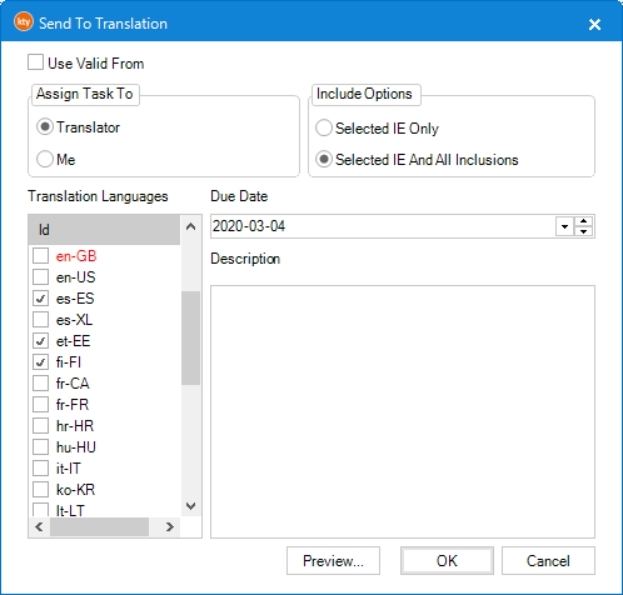
Select to filter according to the valid from date from selected IE. If not selected, then latest version of each IE will be included.
Administrators have a few more options. See Force translate and Retranslate.
Lägg till länk om filtrering -
Check before sending to translation. For more information, see Preview translation.
-
Select who to :
-
Translator when the IE is to be sent to external translator. This is default setting.
-
Me when the IE is to be handled by local editor or illustrator.
-
-
Select at :
-
Selected IE only when only current IE is to be translated.
-
Selected IE and all inclusions when all included IEs are be translated as well. This is default setting.
-
-
Select that the IE is to be translated to. If a previous version of the IE has been translated, the previous languages are selected by default. It is possible to change the setting by selecting and deselecting languages.
-
Select a . "Today" is selected by default. The translation task will be shown in red if due date has passed.
-
Add an optional . This description will be visible for the translator and can provide extra information. The selected languages will be added automatically to this description.
-
Click . The translation task is created with status Not started.
-
For information about downloading the translation file, see Get Translation File.